On this page
Most guides to this format describe it. This one builds one, and shows you the actual images at each step, because the part that decides whether a ChatGPT ad works is the square, and a guide with no pictures cannot teach you what a good square looks like.
Every example below is one product: NuBest Tall Gummies, a mixed-berry children's multivitamin sold into the US. Same brand, same bottle, from the first conversation group to the last square. That is deliberate. Seeing one product succeed and fail in the same placement teaches the format better than four unrelated brands do.
Quick boundary first: LocalAds is not an OpenAI partner, does not place ads, and cannot guarantee any placement. We make the creative you upload. Everything below is dated and sourced so you can check it.
Last verified: 2026-08-17. This channel is changing month to month. Primary sources: OpenAI Ads Manager, Ads in ChatGPT: The Basics, Create ads for ChatGPT Ads, Testing ads in ChatGPT.
Before you start: can you actually buy?
Advertiser accounts are open in 52 markets as of 2026-09-18. The list jumped from 9 to 52 on 2 September, when all remaining European markets, India, and 11 Middle East and North Africa markets opened at once, with no announcement.
Two things get confused constantly here, so be precise about which one applies to you:
| Can open an advertiser account | Ads served to users there | |
|---|---|---|
| US, Canada, Mexico, UK, Australia, NZ, Japan, South Korea, India | Yes | Yes |
| 32 European markets, incl. the full EU and Switzerland | Yes | Yes |
| 7 Middle East and 4 North African markets | Yes | Yes |
| Brazil | Yes | Not yet |
| China, Russia, Turkey, Israel, Sub-Saharan Africa, South-East Asia | No | No |
Self-serve access covers 52 markets as of 2026-09-18, after a single-day jump from 9 on 2 September that opened all remaining European markets, India, and 11 in the Middle East and North Africa. Full market breakdown in where ChatGPT ads are available.
You also need to be in an allowed vertical. Consumer goods, retail, travel, education, and digital products are the core. Health, finance, and legal are restricted.
Restricted is not the same as banned, and the difference matters for the example running through this guide. A children's supplement is a packaged consumer good that sits against the health line: the bottle is retail, the claims are not. In practice that means the product can be advertisable while specific sentences about it are not, and the copy rules below are where that gets decided. Confirm the current policy and your own eligibility inside Ads Manager before you build a set, because this is exactly the boundary that moves.
The seven steps
Step 1: Pick the conversation, not the keyword
ChatGPT ads do not run on exact-match keywords. Targeting works from context hints: topics, needs, and situations that describe the conversation you want to appear beside. There is no guarantee of delivery against any specific prompt.
The practical exercise: write out 30 to 50 things a real customer might type before buying your product, then group them by how far along they are.
For NuBest Tall Gummies, that looks less like "buy kids multivitamin" and more like:
- "how do I get a picky eater to take vitamins"
- "gummy vitamins vs chewable tablets for kids"
- "are gummy vitamins with added sugar bad"
- "how many vitamins does a 9 year old actually need"
Those four are different awareness stages and they want different creative and different copy. Group them, then build one square and one copy line per group. That grouping is your campaign structure.
The live set for this product runs three groups: picky eaters, sugar-free daily nutrition, and parents researching the category cold. Three groups, three squares, three copy lines.
Step 2: Write the title in 16 to 24 characters
This is the constraint that breaks people. You are not writing a headline block. You are writing roughly four words.
OpenAI's own campaign guidance points to a 16 to 24 character title. Some third-party guides publish 50, which appears to be what the upload form accepts rather than what the card displays before truncating. Write to 24 and you never find out the hard way. The full reconciliation is in ChatGPT ads specs.
| Title | Characters | Verdict |
|---|---|---|
| Zero added sugar | 16 | Works. One claim, plain words. |
| Picky eater approved | 20 | Works. Names the outcome. |
| Revolutionize your child's daily nutrition | 42 | Too long, and it says nothing. |
| Shop now | 8 | Fits, wastes the slot. |
The pattern: name the thing the person in that conversation actually wants. Skip the brand name, because the card already shows it.
Notice what none of those four do: promise a result. "Grow taller" is shorter than any of them and would be the obvious title to reach for. It is also a claim about a child's body, which is the fastest way to get a restricted-vertical ad rejected. Write to the attribute on the label, not to the outcome a parent is hoping for.
Step 3: Write the copy line in 32 to 48 characters
One line. Not a primary-text block, not three benefits and a CTA.
| Copy | Characters | Verdict |
|---|---|---|
| 20+ nutrients, zero added sugar. | 32 | Works. Two concrete numbers. |
| Mixed berry. 60 gummies a bottle. | 33 | Works. Specific, not hyped. |
| The best growth supplement for kids, trusted by thousands of parents worldwide | 78 | Too long, unprovable, and a health claim. |
Every line that works here is copied off the pack. That is not a coincidence. On a restricted-vertical product the safest copy line is a fact already printed on the label, because it is verifiable and it is not a promise. The line that fails does three things wrong at once, and only one of them is length.
The tone rule matters more here than on any other channel. The card sits inside an answer someone asked for and trusts. Copy that sounds like a billboard breaks that context and gets ignored. Copy that reads like a specific, useful suggestion does not.
Step 4: Make the square
This is where the ad is won or lost, so it gets the most space.
The image is 1:1, minimum 256x256 pixels, with around 512x512 as the practical target, in JPG, PNG, or WEBP. It renders small. The card supplies its own title and copy, which means the image does not need words and usually should not have them.
Here is a square that works:
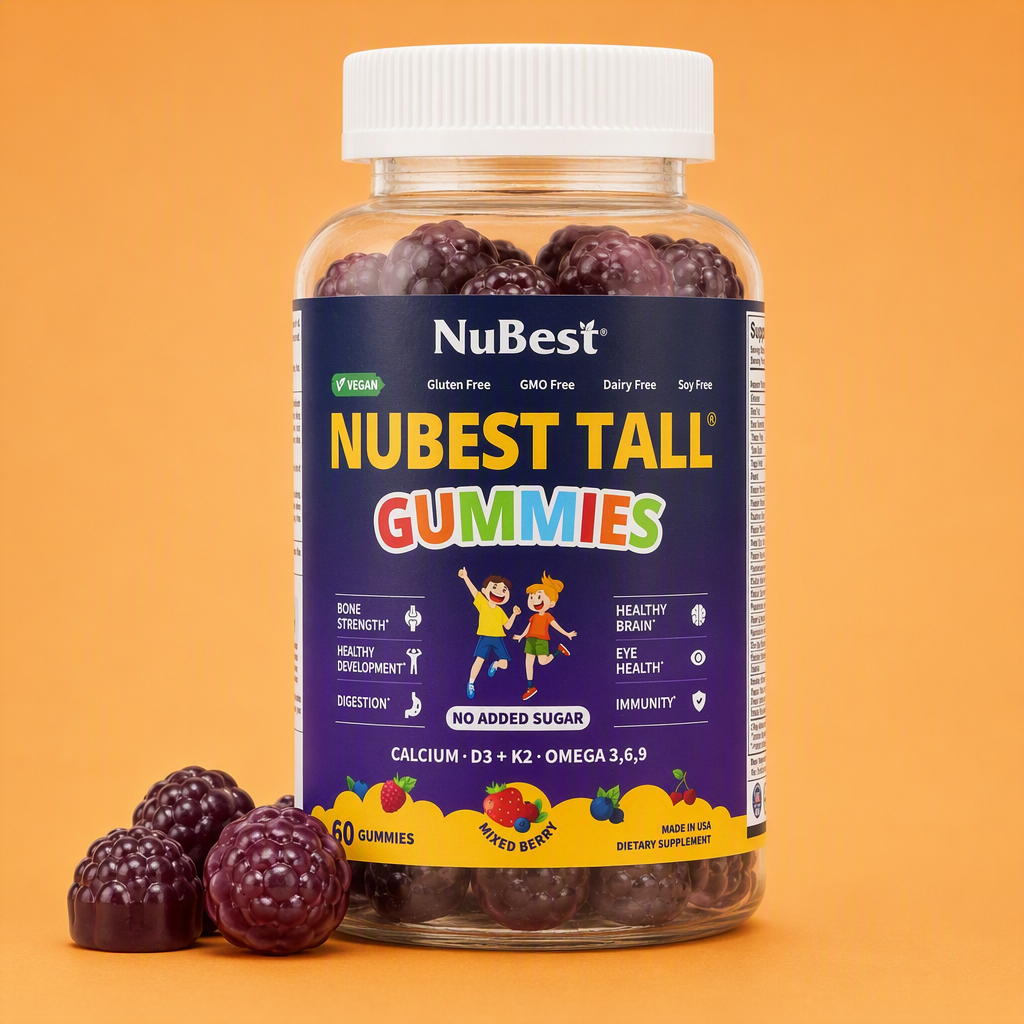
The bottle fills most of the frame, the background is one flat colour with nothing competing in it, and every word in the shot is label copy that was already on the pack. Shrink this to 512 pixels and you still instantly know what is being sold. That is the whole test. The warm background does a second job: it separates the card from the white of the chat around it.
Now three ways the same bottle goes wrong. All three of these are real creative for this product, and all three are perfectly good ads somewhere else.
Wrong 1: the image carries copy the card already gives you.
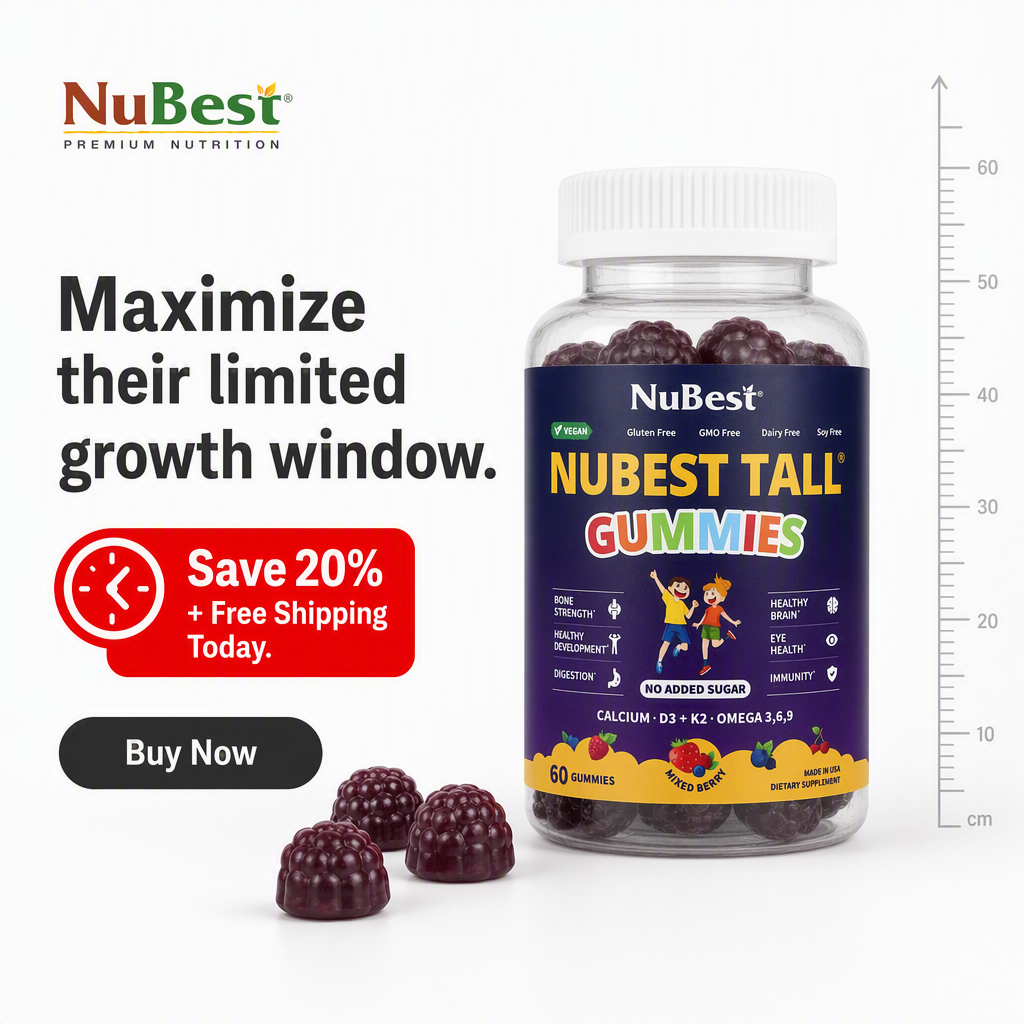
A perfectly good Meta static. In a ChatGPT card it is duplicated effort three times over: the headline competes with the card's own title field, the discount badge competes with the copy line, and the Buy Now button is decoration because the whole card is already clickable. At 512 pixels the headline is the first thing to become unreadable. Worth noting what the headline says, too, since this is a restricted vertical: "Maximize their limited growth window" is the kind of promise the copy rules in Step 2 exist to keep you away from.
Wrong 2: the message depends on reading small text.
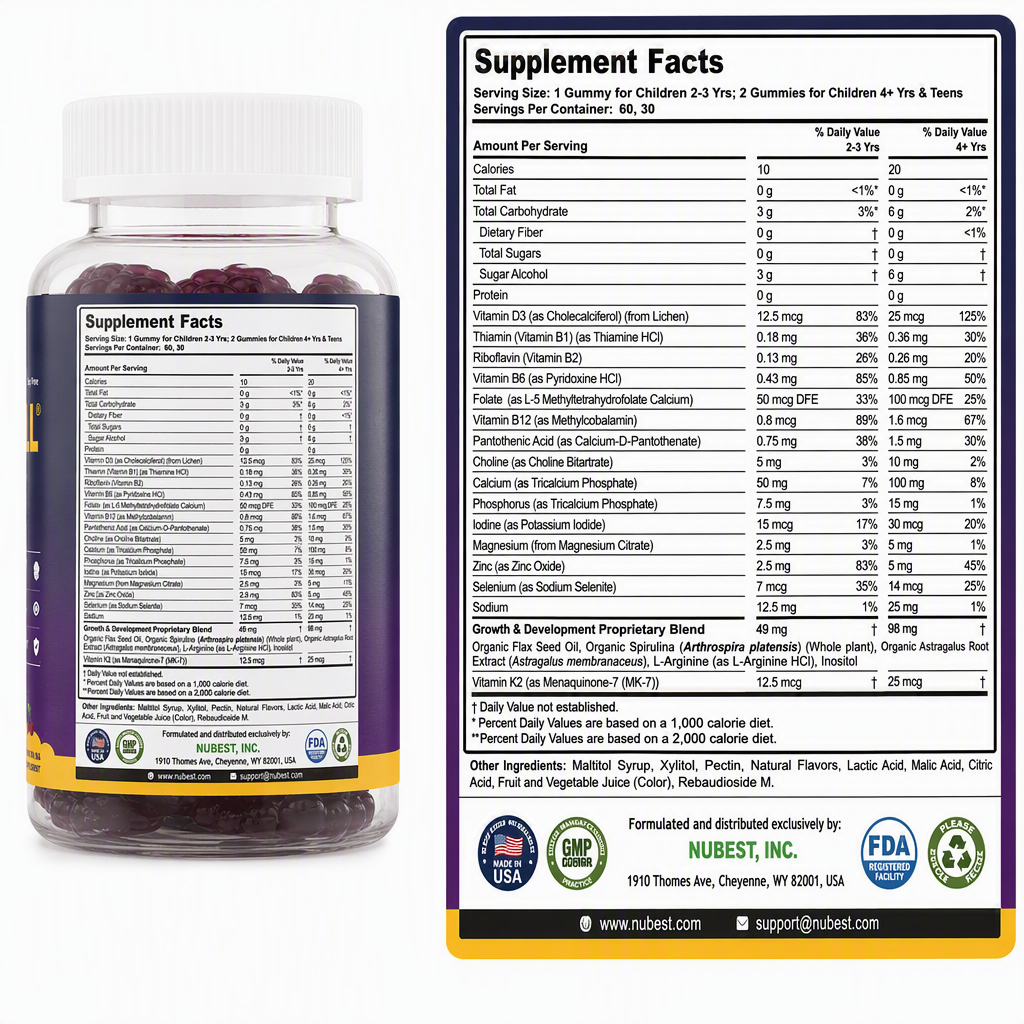
The supplement facts panel is the most persuasive asset this brand owns. It is also the one that survives shrinking the least. This works on a product page where people zoom in and read. In a small card it becomes a grey rectangle with a bottle next to it, and the entire argument is gone. Any creative whose message depends on reading small text is the wrong creative for this placement, no matter how strong that text is.
Wrong 3: beautiful, but the product is tiny.
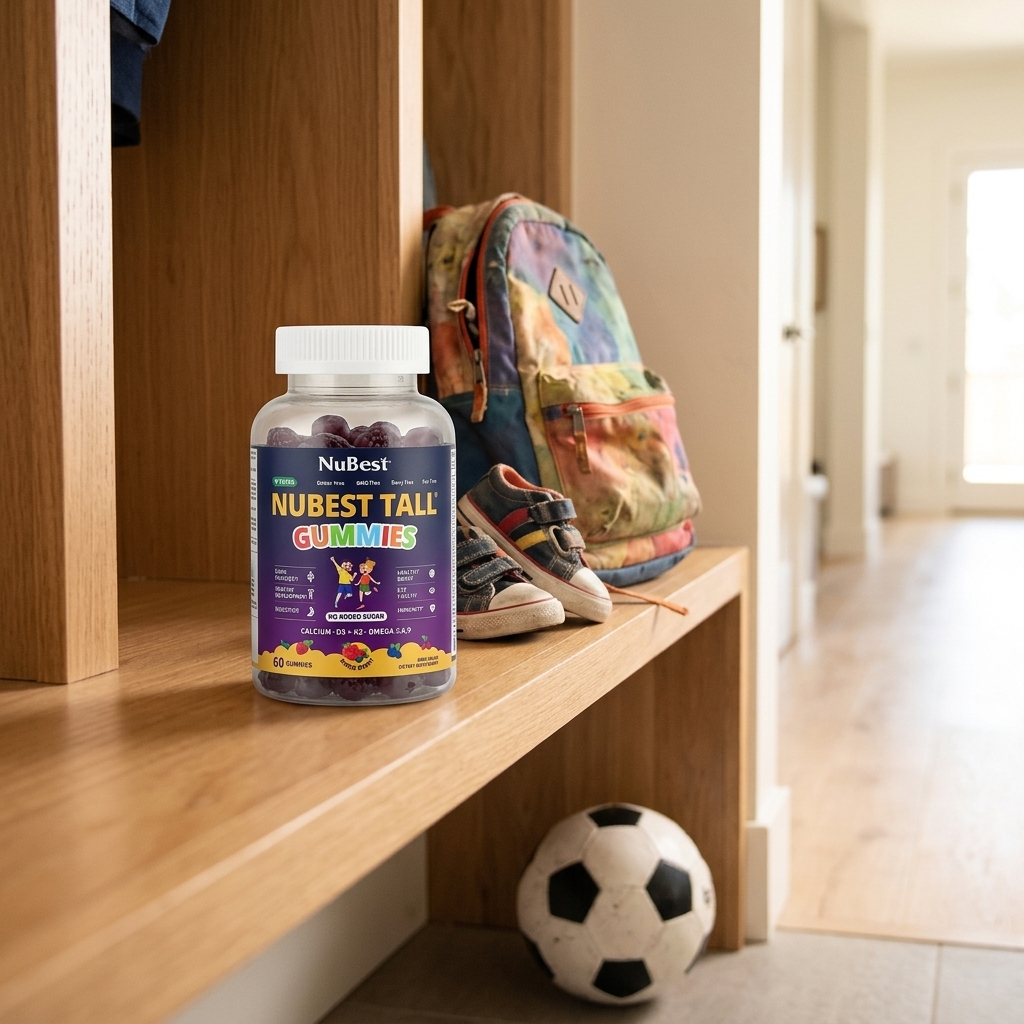
Genuinely nice photography, and the right story for this buyer: the bench by the door on a school morning. But the bottle takes up under a tenth of the frame, and the warm oak behind it sits at almost the same brightness as the label, so it has nothing to separate against. Scaled into a card, this reads as a photo of a hallway. Atmosphere is not free in a placement this small; the product has to dominate, and it has to contrast.
The rule that covers all three: if you cannot tell what is being sold from a thumbnail, the square has failed, no matter how good it looks at full size. Same bottle in all four images. Only the first one passes.
One more practical point. If your creative library is all 4:5 feed statics and 9:16 stories, none of it is the right shape, and recutting a 4:5 to a square usually crops the product badly or leaves burnt-in text stranded. It is faster to generate a square set than to salvage the old one.
Step 5: Point it somewhere that answers the question
Someone clicking a Sponsored card came out of a conversation with a specific question in their head. Sending them to your homepage makes them start over, which is the single most common waste of budget on this channel.
Match the destination to the conversation group from Step 1. If the group was picky eaters, the landing page should open on the flavour and the no-added-sugar line, not on a general brand story about the company. A parent who clicked from "how do I get a picky eater to take vitamins" has one question, and the first screen either answers it or loses them.
Step 6: Set your context hints
Load the topic groups from Step 1 as your context hints. A few things worth knowing:
- Targeting is contextual and semantic, not keyword bidding.
- OpenAI does not give advertisers users' chats, history, or memories.
- Ads reach logged-in adults on the Free and ChatGPT Go tiers. Plus, Pro, Business, Enterprise, and Education are ad-free, so this is a free-tier audience.
- There is no delivery guarantee for any particular prompt, which is why one square per topic group beats one square for everything.
Step 7: Budget, then launch
Buying is CPC and CPM. Reported starting points are around a $25 minimum daily budget and a $3 to $5 recommended maximum CPC, with CPMs cited between roughly $18 and $65 depending on the topic cluster. These come from third-party reporting rather than OpenAI, so confirm current numbers inside Ads Manager before committing spend.
Practical first-campaign shape: pick your two strongest conversation groups, one square and one copy line each, run at the daily minimum long enough to get past noise, and judge the square before you judge the targeting. On a placement this small, the image is the biggest single variable.
Five mistakes worth avoiding
- Writing the copy first, then trimming it to fit. Truncated sentences read as errors. Write to the budget from the start.
- Reusing feed creative unchanged. Wrong ratio, duplicated text, illegible at card size.
- One creative for every topic group. Contextual targeting spreads you across different conversations; one image cannot be relevant to all of them.
- Homepage as the destination. The click came from a specific question.
- Hype adjectives. "Revolutionary" and "unlock their potential" burn characters you do not have, clash with the surrounding answer, and in a restricted vertical they are also the sentences most likely to get the ad rejected.
Where LocalAds fits
LocalAds turns a product URL into 1:1 square creative built from your real product page, so packaging, colours, and claims stay accurate rather than being invented from a text prompt. Every NuBest image in this post is unedited LocalAds output, the passing square and the three failing ones alike, generated from the same product page. That is the honest version of what a tool like this does: it gets the bottle right and it gets you a square set quickly, and you still have to choose which square belongs in which placement. For the Shopify-powered shopping unit, the same product grounding is what keeps feed images clean and correct.
To restate the boundary plainly: we generate the creative and the short copy. You upload them to OpenAI's Ads Manager and run the campaign. We are not an OpenAI partner and cannot guarantee placement. If your blocker is "I do not have square, on-brand, accurate creative for this placement", that is the part we solve. If you are outside the eight open markets, the same set is what makes you ready the day access opens.
FAQ
How do I create an ad for ChatGPT? Group the conversations you want to appear in, write a title of 16 to 24 characters and a copy line of 32 to 48 characters for each group, produce a clean 1:1 square image of at least 256x256 pixels, point it at a landing page that answers that specific question, load your topic groups as context hints, and launch from OpenAI's Ads Manager at around a $25 daily minimum. The square is the part that decides performance.
What image size do I need for ChatGPT ads? A 1:1 square, 256x256 pixels minimum, with roughly 512x512 as the practical target, in JPG, PNG, or WEBP. Because the card supplies its own title and copy fields, the image should be clean and legible when small rather than carrying baked-in headlines.
Can I reuse my Meta ad creative for ChatGPT ads? Usually not. Meta statics are 4:5 or 9:16 and lean on burnt-in headlines, badges, and CTA buttons. In a small square card that already provides its own copy, that reads as cluttered and often becomes illegible. Recutting also tends to crop the product badly. Generating a square set is normally faster than salvaging the old one.
How much do ChatGPT ads cost? Buying is CPC and CPM. Third-party reporting cites roughly a $25 minimum daily budget, a $3 to $5 recommended maximum CPC, and CPMs between about $18 and $65 depending on the topic cluster. OpenAI has not published these figures directly, so confirm current values in Ads Manager.
Who sees ChatGPT ads? Logged-in adults on the Free and ChatGPT Go tiers. Paid tiers, meaning Plus, Pro, Business, Enterprise, and Education, are ad-free.
Can I create ChatGPT ads from India? Yes. India opened to advertisers on 2 September 2026 and registration is self-serve. The practical blocker for Indian brands is creative rather than access: most libraries are text-heavy Meta statics that become unreadable in a card rendered at around 512 pixels.
How many creatives do I need? At least one square and one copy line per conversation group from Step 1. Because targeting is contextual rather than keyword-based, a single creative cannot stay relevant across genuinely different conversations.
The takeaway
Seven steps, but they are not equally weighted. The character limits are a constraint you learn once. The square is the work. Build an image that still says what it is selling at thumbnail size, write four words that name what the person wants, and send the click somewhere that answers their actual question. Then re-check OpenAI's own pages before you spend, because this channel is still moving.
Related reading: