On this page
If you have looked up ChatGPT ad specs more than once, you have seen different numbers. One site says the title is 24 characters. Another says 50. A third says 30. The image is 256 pixels, or 640, or 1200.
They are not all wrong. They are measuring different things, and nobody says which. This page puts every published figure in one table with its source and date, then gives you the values to actually build to.
Boundary note: LocalAds is not an OpenAI partner and does not place ads. We generate the square creative you upload. That means we have no privileged access to OpenAI's systems, so everything here is sourced and dated rather than asserted.
Last verified: 2026-08-17.
Build to these
If you want the answer and not the reasoning, build to the narrower range. It is what OpenAI's own campaign guidance points to, and anything that fits here also fits every wider figure published elsewhere.
| Field | Build to | Format |
|---|---|---|
| Image | 1:1 square, around 512x512px | JPG, PNG, or WEBP, 256x256px minimum |
| Title | 16 to 24 characters | Plain text, no brand name needed |
| Copy | 32 to 48 characters | One line, not a paragraph |
| Advertiser name | Your brand | Shown on the card |
| Favicon | Small square logo | Reported around 128x128px |
| Landing URL | Required | Product or offer page, not your homepage |
Everything below explains why that table looks the way it does.
Why the numbers disagree
Here is every set of figures we could find, with dates, so you can see the spread rather than take our word for it.
| Source | Title | Copy | Image | Dated |
|---|---|---|---|---|
| OpenAI campaign guidance | 16 to 24 | 32 to 48 | Not stated | Official |
| Index Lab, agency claiming early platform access | up to 24 | up to 48 | 1:1, 640 to 1200px | 23 Jul 2026 |
| Lapis | 50 max | 100 max | 256x256px minimum | 1 Aug 2026 |
| Various trade guides | 30, or 3 to 50 | 60, or 100 | 256x256px, favicon 128px | Varies |
Two clusters, not four. One sits at roughly 24 and 48. The other sits at roughly 50 and 100, which is almost exactly double.
Our reading, and we are labelling it as a reading rather than a verified fact: the upload form appears to accept up to about 50 and 100 characters, while the rendered card truncates somewhere near 24 and 48. Sources documenting what the field accepts publish the higher pair. Sources documenting what survives on screen publish the lower pair. OpenAI's own guidance points at the lower pair, which is consistent with it describing what the card actually displays.
We have not been able to verify this against OpenAI's help centre directly, because that domain blocks automated access, and we have not run a controlled test inside Ads Manager. If you have, we would genuinely like to hear about it.
What this means practically: the risk is asymmetric. Writing to 24 characters costs you nothing if the true limit is 50. Writing to 50 costs you the back half of your message if the card truncates at 24. Ads outside the accepted limits are also rejected at review, so overshooting can cost you the campaign rather than just the words.
The image, in detail
The single most consequential spec, and the one people get wrong even when they get the numbers right.
- Ratio: 1:1. Not 4:5, not 9:16. A square.
- Minimum: 256x256 pixels. Around 512x512 is the sensible target. Index Lab reports 640 to 1200 pixels from platform use, so uploading larger than 512 is safe and gives you headroom.
- Formats: JPG, PNG, or WEBP.
- Keep the file small. Trade guidance suggests staying under 1MB.
The specs are the easy half. The hard half is that the card renders small and supplies its own text fields, so the image has one job: be instantly identifiable when it shrinks.
This works:
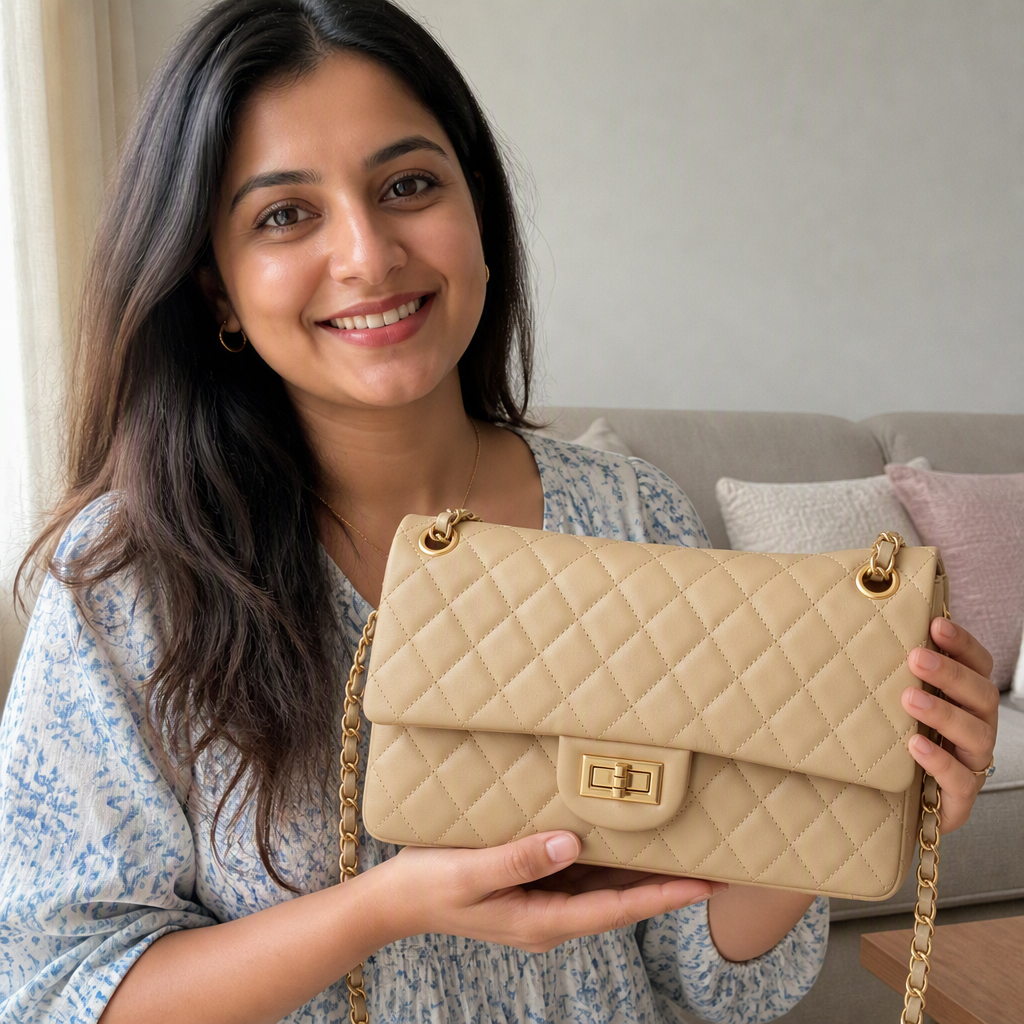
The product dominates the frame, the background is quiet, and there is no text competing with the card's own title. Shrink it and you still know exactly what is for sale.
So does this, in a busier setting, because the product still owns the frame:
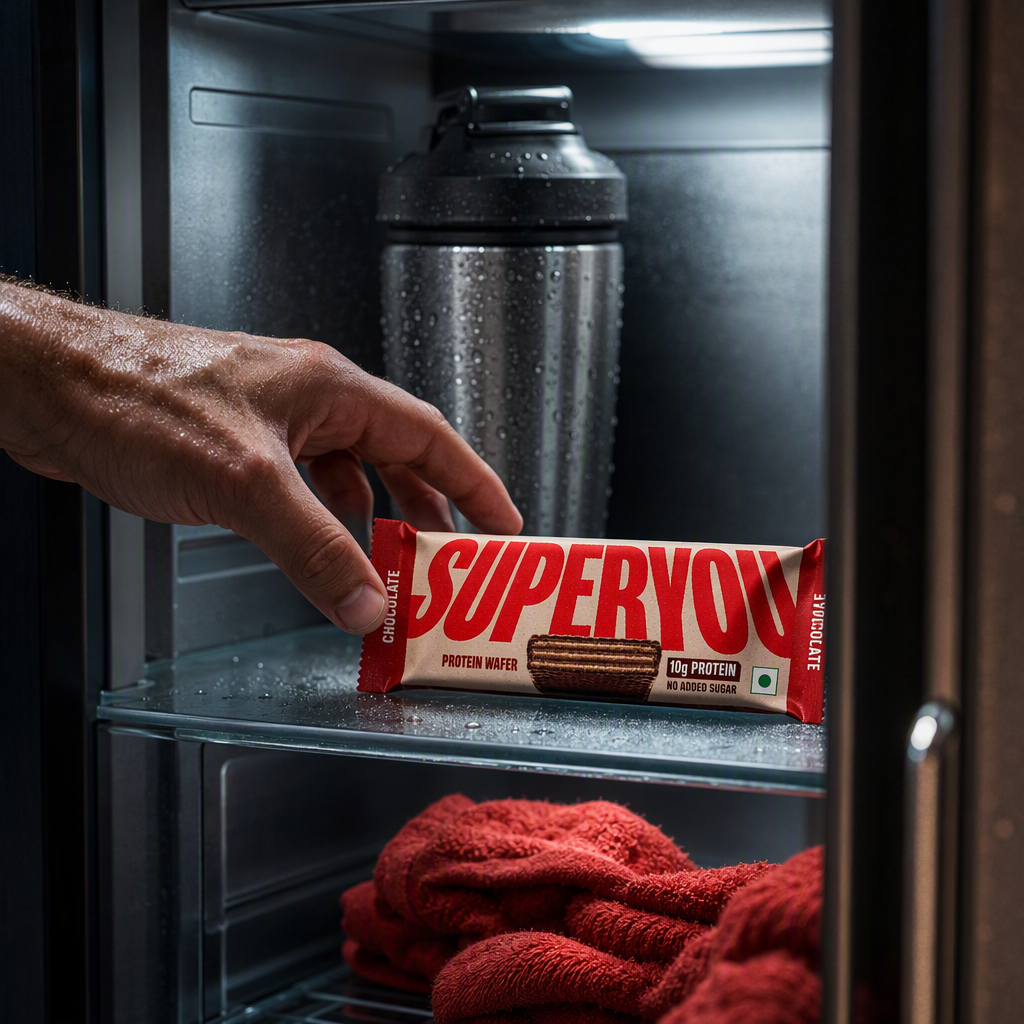
Context and motion are fine. The test is not "is the background plain", it is "does the product read at thumbnail size".
This does not:
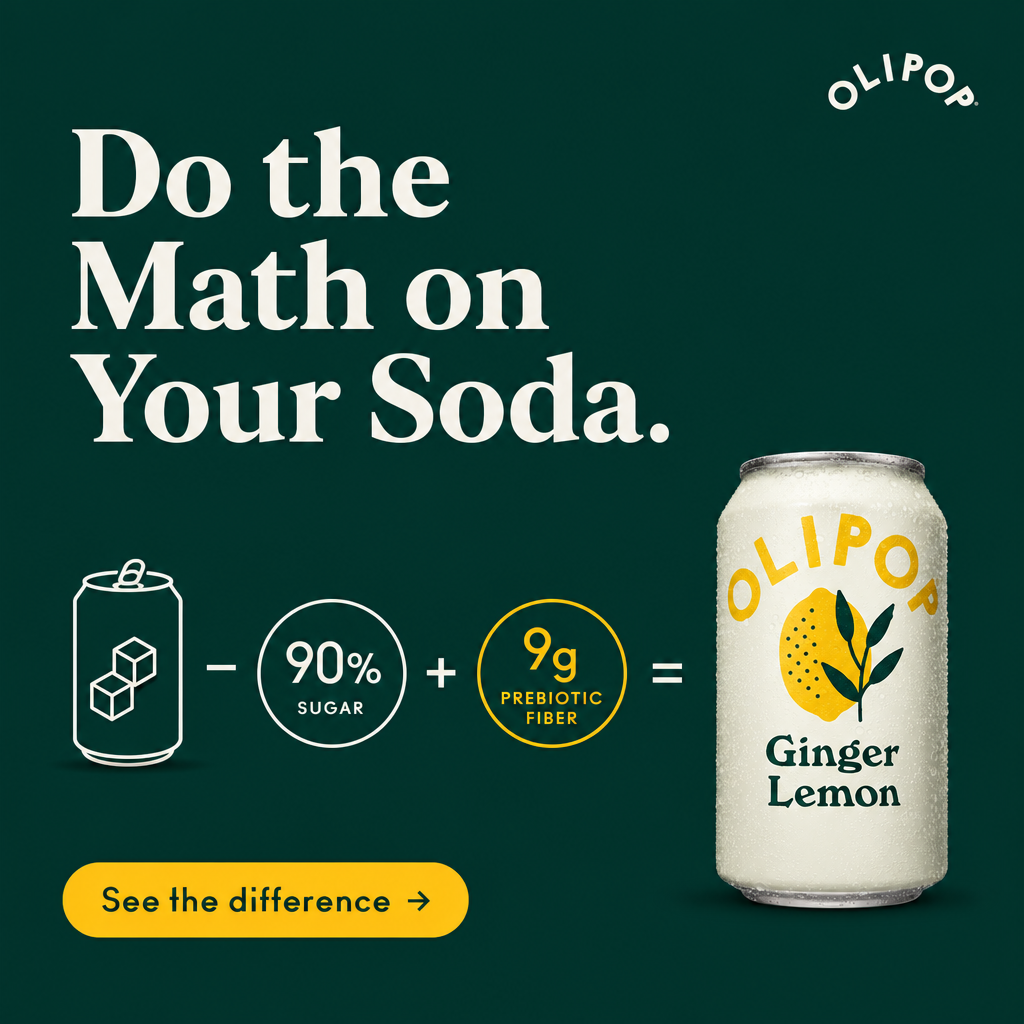
A strong Meta static and completely wrong for this placement. The headline duplicates the card's title field, the icon equation needs to be read to make sense, and the CTA button is decoration because the whole card is clickable. At card size the equation is the first thing to disappear.
The working rule: the card writes the words, the image shows the product. If your square needs to be read, it is the wrong square.
Counting characters properly
Character budgets this tight fail in specific, boring ways. Spaces and punctuation count. Emoji are a bad idea in a placement that renders small. Write to the budget rather than trimming to it, because trimmed sentences read as errors.
| Title | Count | Fits 24? |
|---|---|---|
| Leakproof, all night | 20 | Yes |
| Sleep without a pad | 19 | Yes |
| 10g protein, no sugar | 21 | Yes |
| Revolutionize your skincare routine | 35 | No |
| Copy line | Count | Fits 48? |
|---|---|---|
| Holds up to 4 tampons. 200+ washes. | 35 | Yes |
| Soft-stretch fit that moves with you. | 37 | Yes |
| Real ginger juice, 3g of sugar per can. | 39 | Yes |
| The best period underwear on the market, trusted by thousands worldwide | 71 | No |
The pattern in everything that fits: one concrete claim, plain words, no brand name (the card already shows it), no hype adjectives.
Fields that are not the image or the copy
- Advertiser name. Your brand, displayed on the Sponsored card.
- Favicon. Your small square logo, reported at around 128x128 pixels. Verify before you build; this figure appears in trade guides rather than in OpenAI's own documentation.
- Landing URL. Required. Send the click to a page that answers the question the conversation was about, not your homepage.
- Shopping unit. A Shopify-powered product-spotlight carousel with image, price, and checkout was added in March 2026. For that unit your product feed quality is the ad: clean titles, accurate live pricing, correct availability, and high-resolution square images.
Who and where
Worth restating alongside the specs, because a perfect creative in a closed market is still nothing.
- Audience: logged-in adults on the Free and ChatGPT Go tiers. Plus, Pro, Business, Enterprise, and Education are ad-free.
- Advertiser markets, as of 2026-09-18: 52 self-serve markets, up from 9 on 1 September. 32 in Europe, 5 in Asia-Pacific including India, 7 in the Middle East, 4 in North Africa, 3 in North America, plus Brazil. China, Russia, Turkey, Israel, Sub-Saharan Africa and South-East Asia remain absent from the list.
- Restricted verticals: health, finance, and legal.
Full market detail, including why "can buy" and "ads served here" are different things, is in ChatGPT ads examples and specs.
Changelog
- 2026-08-17: First published. Reconciled the 24/48 and 50/100 figures across four source groups, marked the truncation explanation as an unverified reading.
FAQ
What are the ChatGPT ad specs? A 1:1 square image of at least 256x256 pixels, with around 512x512 the practical target, in JPG, PNG, or WEBP; a title of 16 to 24 characters; a copy line of 32 to 48 characters; your brand name; a small square favicon; and a required landing URL. Build to the narrower character range, because anything that fits it also fits every wider figure published elsewhere.
What image size do I need for ChatGPT ads? Square, 1:1, minimum 256x256 pixels. Around 512x512 is the sensible target and agencies with platform access report 640 to 1200 pixels being used, so larger is safe. JPG, PNG, or WEBP, ideally under 1MB.
Is the ChatGPT ad title limit 24 characters or 50? Both numbers are published. Our reading is that the upload form accepts roughly 50 while the rendered card truncates near 24, and OpenAI's own campaign guidance points at the 16 to 24 range. We have not verified this with a controlled test, so treat it as a reading. Build to 24 either way, because the risk is asymmetric: staying short costs nothing, and going long risks truncation or rejection at review.
Why do different websites list different ChatGPT ad specs? Because they are measuring different things and rarely say so. Figures documenting what the upload field accepts are higher than figures documenting what the card displays. Dates matter too, since the platform has changed repeatedly through 2026, so a guide that looks authoritative may simply be describing an earlier version.
Do ChatGPT ad images need text on them? No, and usually they should not have any. The Sponsored card provides separate title and copy fields, so text baked into the image duplicates those fields, competes with them, and is the first thing to become unreadable at card size.
Can I use my Meta ad creative for ChatGPT ads? Rarely without rework. Meta statics are typically 4:5 or 9:16 and rely on burnt-in headlines and CTA buttons, none of which suit a small square card that supplies its own copy. Recutting to 1:1 tends to crop the product awkwardly or strand text. Generating a purpose-built square set is usually faster.
The takeaway
The specs are simple once you stop trying to reconcile the internet's numbers yourself: one square, 16 to 24 characters of title, 32 to 48 of copy. Build to the narrow range, put the product in the middle of the frame, let the card supply the words, and re-check OpenAI's own pages before a launch, because this channel has moved twice already this year.
Need the squares themselves: ChatGPT ads creative from a product URL.
Related reading: