Video ads

The photo you already approved, now moving.

Animate takes a still from your photoshoot and renders it as a short product video. Not a new scene, not a lookalike product: the exact frame you signed off on, with motion added. No shoot, no crew, no second brief.

4 to 15 seconds from any stillThe approved product cannot driftYou keep the media buying
How it works

Stills first. Motion second.

Video normally means a second production process with its own brief, its own crew, and its own risk that the product ends up looking different than it did in the stills. Animating a frame you already have removes all three.

Step 01

Shoot the stills first

Run a photoshoot from your product URL, or use ad creatives you have already generated. Video starts from work you have done rather than from a blank brief, so there is no second onboarding.

Step 02

Pick the frame worth moving

The right candidate is usually the still that already performed. Because Animate moves that exact frame, a static winner becomes a video variant without risking a product that looks subtly different.

Step 03

Animate, then download

Choose a length and a ratio, add a motion note if you want a specific camera move, and render. The clip lands in your feed next to the still it came from, ready to upload wherever you buy.

Animate

Stills that started moving.

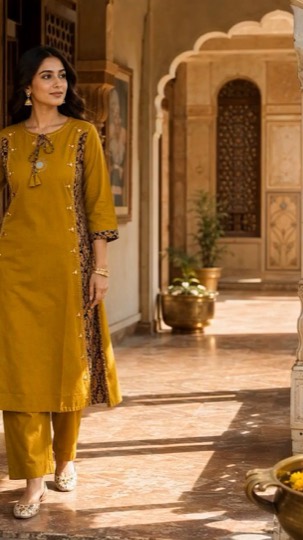
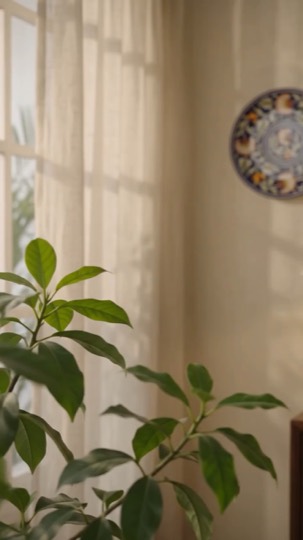
On the left, the still from a customer's photoshoot gallery. On the right, the clip it became. The product is the one they already approved, because Animate moves that exact frame rather than generating a new scene.

StillThe still Animate started from: A mustard kurta set in a sunlit courtyard, animated from a single styled still.
Video
9:16 · apparelA mustard kurta set in a sunlit courtyard, animated from a single styled still.
StillThe still Animate started from: A hand-painted blue pottery wall plate behind sheer curtains, with a slow push and drifting light.
Video
9:16 · home decorA hand-painted blue pottery wall plate behind sheer curtains, with a slow push and drifting light.
Specs

What Animate takes, and what it gives back.

SpecValueNotes
SourceAny finished stillA photoshoot frame or an ad creative already in your gallery
Length4 to 15 secLong enough for feed and Reels, short enough to stay cheap to test
Cost4 credits / secA 4 second clip is 16 credits, drawn from the same monthly balance
Vertical9:16 and 3:4Reels, Stories, Shorts, and TikTok
Square1:1Feed placements that still prefer square
Landscape16:9, 4:3, 21:9In-stream, landing page loops, and wide hero sections
What you get

Motion, without a new production.

The product cannot drift

This is the whole argument for animating a still rather than generating a video from scratch. A text-to-video model invents a plausible version of your product every time it renders. Animate starts from a frame you have already looked at and approved, so the packaging, the colourway, and the label are the ones you signed off on.

  • Renders the exact still, rather than a new interpretation of it
  • Composition, lighting, and styling all carry through
  • The source still stays linked to the clip it produced
  • Nothing new to brief, approve, or check for accuracy

Turn a proven static into a video test

The cheapest video ad is one built on a static that already works. You know the angle converts, so the only variable you are adding is motion. That makes it a genuine test rather than a fresh gamble with a new concept and a new production cost attached.

  • Animate any finished still from your feed
  • 4 credits per second of output
  • Same monthly credits as stills, listing images, and photoshoots
  • Regenerate a clip without touching the still it came from

Sized for vertical, not locked to it

Reels, Shorts, and TikTok are vertical, in-stream is not, and a landing page loop is usually neither. The output ratio is chosen when you render, so you are not cropping a 9:16 clip into a 16:9 slot after the fact and losing the sides of the frame.

  • 6 output ratios available
  • 9:16 and 3:4 for Reels, Stories, Shorts, and TikTok
  • 1:1 for square feed placements
  • 16:9, 4:3, and 21:9 for in-stream and landing pages

Direct the motion, or let it read the frame

Left alone, Animate picks a move that suits the composition: a slow push on a hero shot, drifting light across a flat lay. When you have something specific in mind, a short motion note steers it without turning the job into a full video brief.

  • Optional motion direction per render
  • Sensible default movement when you leave it blank
  • Subtle by default, because product video rarely wants drama
  • Re-render with a different note if the first move is wrong
What we do and do not do

LocalAds animates your stills

Short product video rendered from frames you already approved, in the ratio you need, drawn from the same credits as the rest of your plan. You own the output and can run it anywhere you buy.

LocalAds does not buy media

We do not place or manage ads and never need ad account access. You download the clips and upload them yourself. Output is AI generated, so disclose that wherever the platform or your market requires it.

FAQ

The questions video buyers actually ask.

How do I turn a product photo into a video?

Any finished still in your feed has an animate action. Choose a length between 4 and 15 seconds and an output ratio, optionally add a motion note, and render. The clip appears in your feed next to the still it came from.

How much does it cost in credits?

4 credits per second of output, so a 4 second clip is 16 credits and a 10 second clip is 40. It draws on the same monthly balance as ad creatives, product photos, and Amazon listing images, so there is nothing extra to buy.

Will the product still look like my product?

Yes, and that is the point of animating a still instead of generating a video from a description. A text-to-video model invents a new version of your product on every render. Animate moves the exact frame you already approved, so packaging, colour, and label detail carry through unchanged.

What aspect ratios can I export?

9:16 and 3:4 for Reels, Stories, Shorts, and TikTok, 1:1 for square feed placements, and 16:9, 4:3, or 21:9 for in-stream and landing pages. The ratio is chosen at render time rather than cropped afterwards.

Can I animate an ad creative, not just a photoshoot image?

Yes. Any finished still works, whether it came from a photoshoot or from a campaign. Animating a creative that already tested well is usually the best first move, because the angle is proven and motion is the only new variable.

Does LocalAds upload the videos to my ad accounts?

No. We generate the creative and nothing else. You download the clips and upload them to Meta Ads Manager, TikTok Ads Manager, Google Ads, or wherever you buy. We never need access to any ad account.

Get the motion

Video was the shoot
you kept postponing.

You already have the stills. Animating the best one costs a few credits and takes minutes, which is the whole reason to stop postponing it.

Start free trial

7 days free · cancel before you're charged