On this page
"Ad creative management" is one of those phrases that means three different things depending on who is selling it to you. To an enterprise platform it means trafficking hundreds of banner variations through an approval workflow. To a design tool it means keeping your templates organized. To a performance marketer it usually means something much more basic: how do I produce, vary, and keep track of enough ad creatives to feed my campaigns without the whole thing collapsing into a folder named "final_v7"?
This guide takes the performance marketer's definition seriously. We will break creative management into its five real jobs, map which AI tool categories actually handle each one, and give a straight answer for the most common situation we see: a small team, no dedicated designer, and campaigns that eat creatives faster than anyone can make them. Where LocalAds fits, we will say so plainly. Where you need a different category of tool, we will point you there.
The five jobs hiding inside "creative management"
Before comparing tools, split the phrase into the work it actually contains:
- Production: making the creatives in the first place (image, copy, layout).
- Variation: producing many distinct versions per product or offer, not one hero image.
- Consistency: keeping every version recognizably on-brand across a batch.
- Formats and resizing: delivering each concept in the sizes Meta, Google Display, TikTok, and Pinterest expect.
- Iteration: knowing what ran, what won, and feeding that back into the next batch.
Most tools marketed for "creative management" are strong at exactly one or two of these. Enterprise creative management platforms (CMPs) are built for jobs 3 through 5 at very large scale and assume job 1 is handled by your design team. Generation-first tools attack jobs 1 and 2 and are catching up on 3 and 4. Nothing does all five perfectly, which is why naming your bottleneck matters more than reading a ranked list.
Here is the landscape in one view:
| Tool category | Examples of the type | Strong at | Weak at | Designer needed? |
|---|---|---|---|---|
| Enterprise CMPs | Smartly, Celtra, Bannerflow | Consistency, resizing, trafficking at scale | Producing the creative itself; cost | Yes |
| Template/design tools | Canva, AdCreative-style | Brand control, one-off layouts | Volume and variation; you supply assets | Mostly |
| Copy generators | ChatGPT and similar | The language layer: hooks, headlines | Everything visual | Yes, for the rest |
| URL-to-creative tools | LocalAds | Production, variation, consistency from one input | Enterprise trafficking and approval workflows | No |
What each category honestly gets you
Enterprise CMPs. If you are an agency or a brand running hundreds of concurrent campaigns across markets, with a design team producing master assets, a CMP earns its price by automating resizing, versioning, and distribution. The honest caveat: a CMP manages creatives that already exist. If your problem is that the creatives do not exist yet, a CMP gives you a beautifully organized empty library.
Template and design tools. Great when you have photography, a brand kit, and someone who enjoys layout work. They keep quality high for one-offs and hero assets. They do not solve volume: every variation is still a manual pass, which is exactly the work that piles up when a campaign needs twenty creatives instead of two.
Copy generators. ChatGPT is genuinely useful for the language layer, and we maintain tested prompt libraries for D2C ad copy. But copy is one of five jobs. A creative management stack built on ChatGPT alone leaves you with strong headlines and nothing to put them on.
URL-to-creative tools. This is the newest category and the one built for the production-and-variation bottleneck. You give the tool a product URL; it reads the page (product, claims, tone), plans audiences and angles, and renders finished, on-brand creatives in batch. The management burden shrinks because variation and consistency are generated properties rather than manual disciplines: every creative in a batch comes out of one strategy and one visual system.
This is easier to show than to describe. The cover image of this post is a real LocalAds batch for OLIPOP Vintage Cola: nine distinct creatives (hero shots, lifestyle scenes, ingredient close-ups, a 12-pack shot) produced as one consistent set from a single product input. That grid is creative management, done at generation time instead of in a spreadsheet afterward.
Display ad software for teams without a dedicated designer
The question we hear most often is some version of: "we run display and paid social, nobody on the team is a designer, what software actually works for us?"
The honest answer has two parts.
First, on formats: display advertising has largely moved to asset-based systems. Google's responsive display ads assemble your images, headlines, and logos into layouts automatically, which means the job is no longer "design 15 banner sizes," it is "supply strong image assets and copy." That shift is what makes designer-free display advertising realistic at all: the platform handles layout mechanics, and your software needs to handle asset production.
Second, on production: for a team without a designer, the deciding factor between tool categories is whose labor each one assumes. Template tools assume design labor. CMPs assume a creative team upstream. Generation-first tools assume neither, which is why they are usually the right first purchase for a designer-less team. A batch like this Liquid Death creative took no design pass:

A real LocalAds output. Scene, product rendering, headline, and claim lines are one generated frame. The claims ("0g sugar, 100mg caffeine") come from the product's actual page, which is what keeps a no-designer workflow from becoming a no-review workflow.
One warning that applies to every category: platforms still enforce their own creative rules. Meta's ad standards govern what your creatives can claim and show regardless of which tool produced them. Software removes the design bottleneck, not the review step.
Variation is the management problem that matters
Here is the uncomfortable arithmetic behind creative management in 2026. Paid social platforms reward broad targeting plus many creatives, and creative fatigue sets in fast enough that winning ads stop converting within weeks. A team that produces two creatives per month does not have a management problem; it has a production problem that no amount of organization will fix.
In our own product data, a single product URL run through LocalAds typically yields nine or more distinct, launch-ready creatives in one pass, each pairing a different angle with a different scene. That is the volume at which management questions (which angle won, which audience saw what) become real, and it is also the volume at which generated consistency beats manual discipline. Two more outputs from different product categories, to make the range concrete:
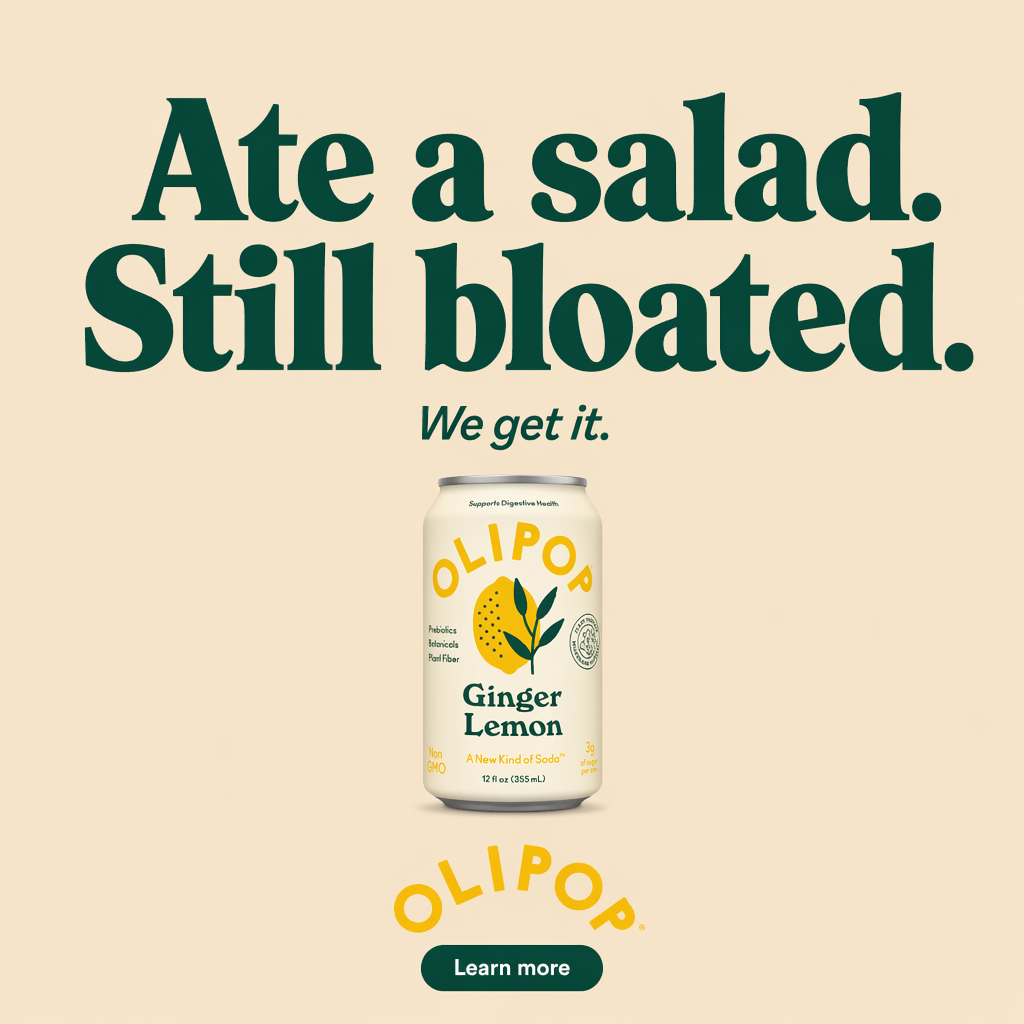
A problem-aware angle for the same brand as the cover grid. The headline does the targeting: it speaks to a digestive-health audience without a single interest-targeting checkbox.
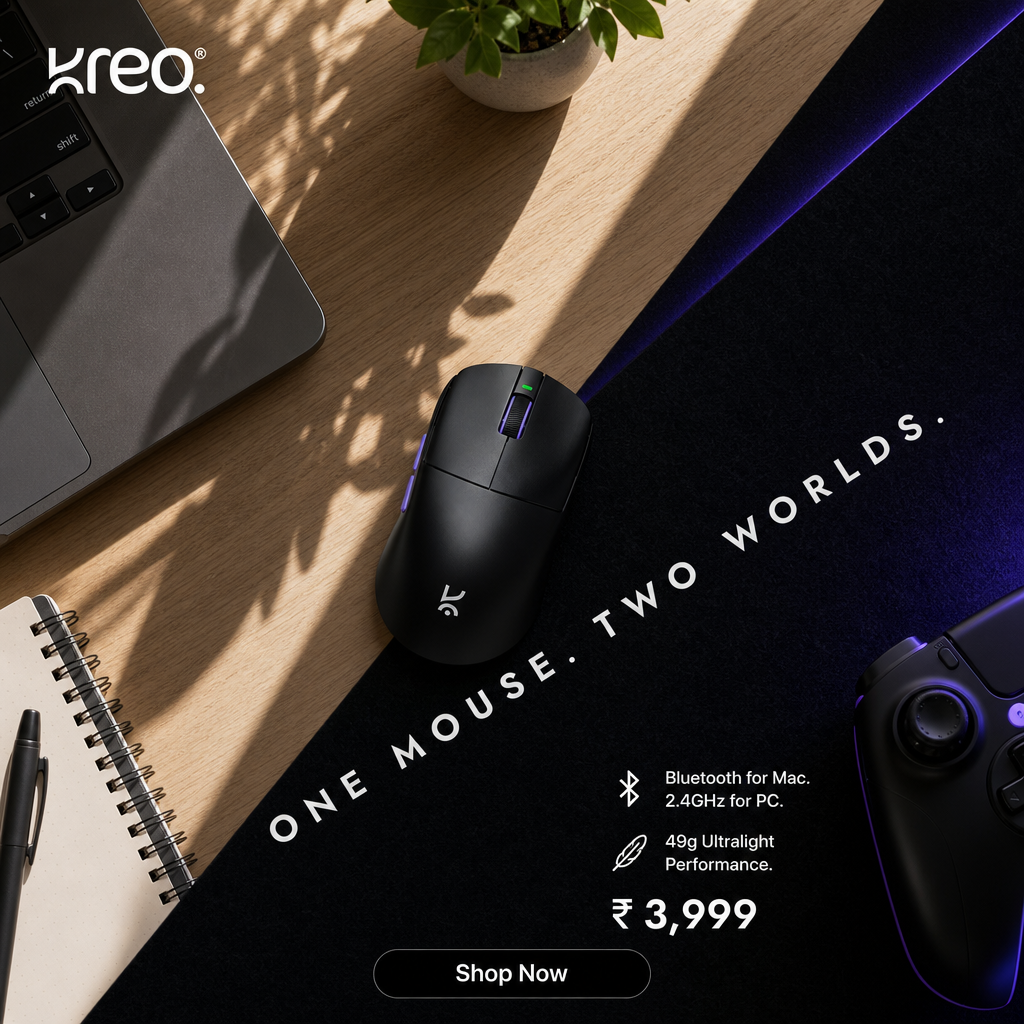
Same system, different vertical: a gaming accessory rendered as a lifestyle flat-lay with spec callouts. Creative management across a varied catalog means the system, not the designer, carries the consistency.
How to choose, in one pass
- You have a design team and hundreds of live campaigns across markets → an enterprise CMP is what it is priced for.
- You have photography and a designer, and need occasional polished layouts → a template/design tool.
- Your bottleneck is copy → a copy generator, prompted properly and reviewed.
- Your bottleneck is producing varied, on-brand creatives at volume, with no designer → a URL-to-creative tool. Start there and add a CMP only if trafficking scale later demands it.
- You are not sure → count last month's shipped creatives. Under ten, your problem is production, not management. Over a hundred, it is probably both.
A two-tool stack (generation-first for production and variation, plus the ad platforms' own asset systems for delivery) covers the five jobs for most small and mid-size teams. See our deeper comparison of the generation category in best AI ad creative tools for D2C brands.
Where LocalAds fits
LocalAds is a URL-to-creative tool. You give it a product URL and it reads the page, builds a strategy tree of audiences, angles, and hooks, and renders each into finished, on-brand static creatives sized for Meta, TikTok, Pinterest, and YouTube, with the option to animate any of them into video. It handles the production, variation, and consistency jobs in one pass, which is most of what small teams actually mean by creative management.
It is not a CMP: if you need approval chains, DCO trafficking, and multi-market versioning workflows, that is the enterprise category. If you need the creatives to exist, in volume, on brand, without hiring, that is ours.
FAQ
What are the best AI tools for ad creative management? It depends on which of the five jobs (production, variation, consistency, resizing, iteration) is your bottleneck. Enterprise CMPs like Smartly or Celtra are best when creatives already exist and need trafficking at scale. URL-to-creative tools like LocalAds are best when the bottleneck is producing varied, on-brand creatives in the first place, which is the common case for teams without a dedicated designer.
What is display ad software with AI creative generation for teams without a designer? It is the combination of a generation-first creative tool (which produces finished image ads from your product page, no design labor) with the ad platforms' asset-based delivery systems, like Google's responsive display ads, which handle sizing and layout automatically. Together they remove the two places a designer used to be mandatory.
Do I need a creative management platform (CMP)? Only at scale. If you run hundreds of concurrent campaigns with a design team producing master assets, yes. If you ship fewer than a few dozen creatives a month, a CMP organizes a library you have not filled; fix production first.
How many ad creatives do I actually need to manage? More than most teams produce. Broad-targeting campaign types on Meta and Google perform best with many creative variations per ad set, and creative fatigue retires winners within weeks. Plan for batches of five to ten distinct creatives per product or offer, refreshed monthly, and let that number drive your tool choice.
Can AI keep generated creatives on-brand across a batch? Yes, when the tool anchors to your real product page rather than a text prompt. Generation from the page keeps packaging, claims, and tone consistent across every variation in a batch, which is the consistency job of creative management handled at generation time. Review remains yours, especially for claims.
The takeaway
"Ad creative management" is five jobs, and the tools that market the phrase hardest solve the two jobs (organization and trafficking) that only matter after production is solved. Count your shipped creatives before you shop. If the count is low, buy production: a URL-to-creative tool collapses shoot, copy, design, and variation into one input and gives you batches that arrive already consistent.
If that is your situation, generate ads from your product URL and judge the batch against the nine-panel grid at the top of this post. Manage creatives you actually have.
Related reading: