On this page
The direct answer: for a non-expert, the best AI ad platform is one where the input is something you already have (your product page URL) and the output is a finished ad, with strategy, copy, design, and sizing handled in between. That is the URL-to-creative category, and it is the only category that does not quietly assume you bring a missing skill: prompting ability, design judgment, or media-buying vocabulary. LocalAds is our tool in that category, and this guide will be honest about where others fit too.
Now the longer answer, because "best for non-experts" depends on what the tools expect you to already know, and most comparison articles never check.
Every "easy" ad tool assumes a skill. Name yours.
Marketing software calls itself beginner-friendly when the interface is clean. But interface is not the barrier; assumed knowledge is. Here is what each category of AI ad tool actually expects from you:
| Tool category | What it assumes you can do | Where non-experts get stuck |
|---|---|---|
| Prompt-based image generators | Write detailed visual prompts, iterate | "Blank prompt box" paralysis; off-brand output |
| Template/design tools | Choose layouts, supply photos, judge design | Hours in the editor; results look homemade |
| Avatar/UGC video tools | Write scripts, direct a video, edit | Script quality decides everything |
| Full campaign suites | Understand budgets, audiences, pixels | Jargon wall before the first ad exists |
| URL-to-creative platforms | Paste a URL | Judging which outputs to run (a real but small skill) |
The pattern: most "AI ad tools" automate the part of the job they are good at and hand you the part they are not. A prompt-based generator automates rendering but hands you art direction. A template tool automates layout mechanics but hands you design taste. For an actual non-expert, the question is not "which tool is most powerful," it is "which tool leaves me the smallest homework."
What a non-expert actually needs, in order
- No blank inputs. A prompt box is a test you can fail. A URL field is not.
- Strategy included. Knowing what to say to whom is the real expertise gap. The platform should propose audiences and angles, not wait for yours.
- Finished output. "Almost done, just tweak it in the editor" means a design task. Non-experts need launch-ready files in the right sizes for each platform.
- Honest claims by default. Ad platforms enforce content rules (Meta's ad standards apply no matter what tool made your ad), and generated copy that invents claims is a beginner trap. Output built from your real product page starts safer than output built from a text prompt.
- A path to video. You should not need a second tool and a second learning curve the day you want motion.
Here is what points 1 through 3 look like in practice. This ad was generated from a product URL, with no prompt, no brief, and no design pass:
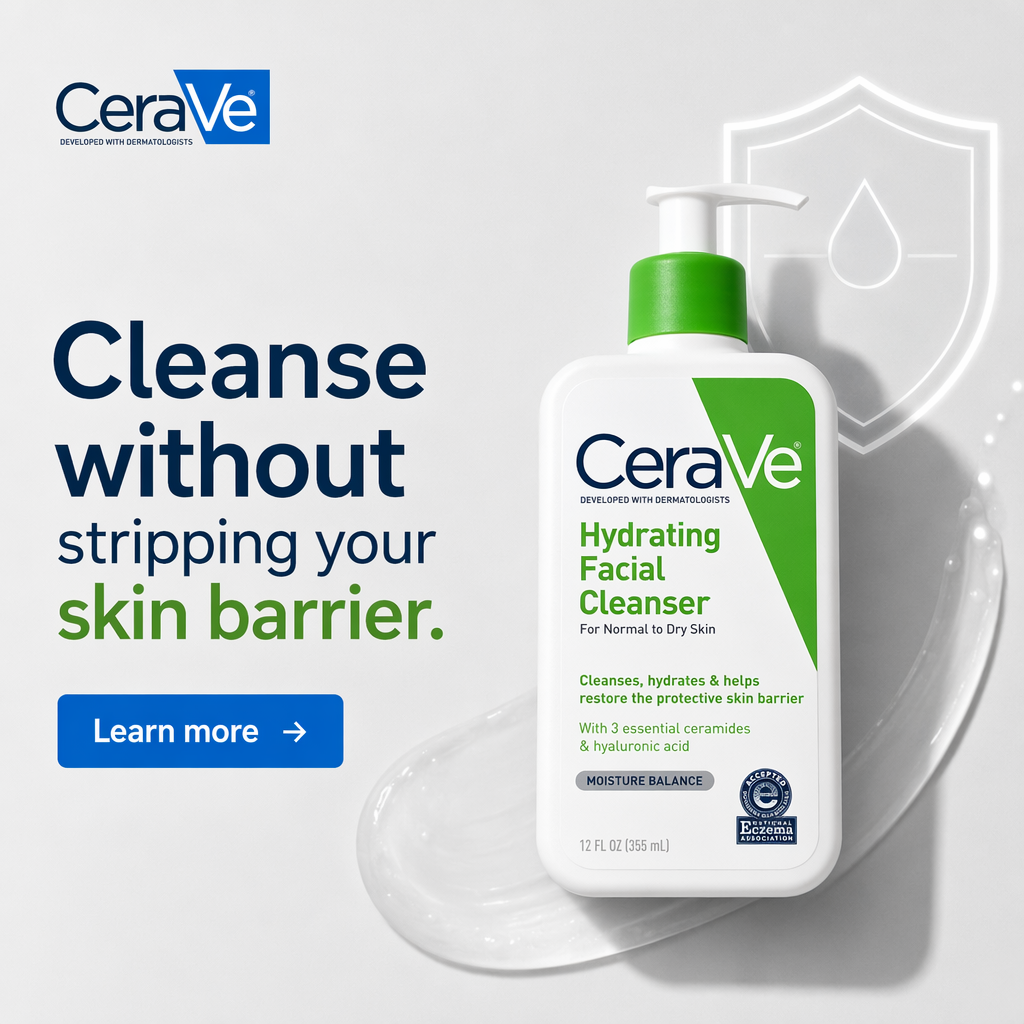
A real LocalAds output. The platform read the product page, found the claim that matters (barrier-safe cleansing, ceramides), picked the audience-fitting angle, and rendered a finished creative with brand-accurate packaging. The "expertise" a non-expert lacks (what to say, to whom, laid out how) is exactly the part that got automated.
The honest comparison for non-experts
Prompt-based generators (Midjourney-style, GPT image tools). Powerful, genuinely fun, and wrong for this job. You become the art director, copywriter, and brand police at once. Non-experts get beautiful images that are not ads: no offer, no layout logic, packaging that drifts from the real product.
Template and design tools (Canva-style). The best choice if you want to learn design and enjoy the craft. The honest downside: the tool improves your hands, not your judgment. Non-experts can spend three hours and ship something a media buyer would spot as homemade in one second.
Avatar-roster video tools (Arcads-style, Creatify-style). Real category, wrong entry point. Casting a presenter and writing a script is the advanced class: pacing, hook, retention. If you cannot yet judge a static ad, you cannot yet judge thirty frames per second of them. Start with statics, then let the winners become video. We compare the options in Creatify vs LocalAds.
Full campaign suites. These manage budgets, audiences, and delivery, and they assume ads already exist. A non-expert who starts here meets a wall of pixels and attribution settings before producing a single creative. Note that the ad platforms themselves now do heavy lifting on delivery: Google's responsive display ads auto-assemble layouts from assets, and Meta's Advantage+ handles targeting broadly. The gap left for you is good creative assets, which is precisely the gap a creative platform should fill.
URL-to-creative platforms (LocalAds). Paste a product URL; the platform reads the page, builds a strategy tree of audiences, angles, and hooks, and renders finished, on-brand static ads sized for Meta, TikTok, Pinterest, and YouTube, each animatable to video later. What remains for you is selection: looking at a batch and picking the ads that feel true to your brand. That is a judgment call a founder can make on day one, which is the definition of non-expert-friendly.
One more real output, because "finished" is the claim that matters most:
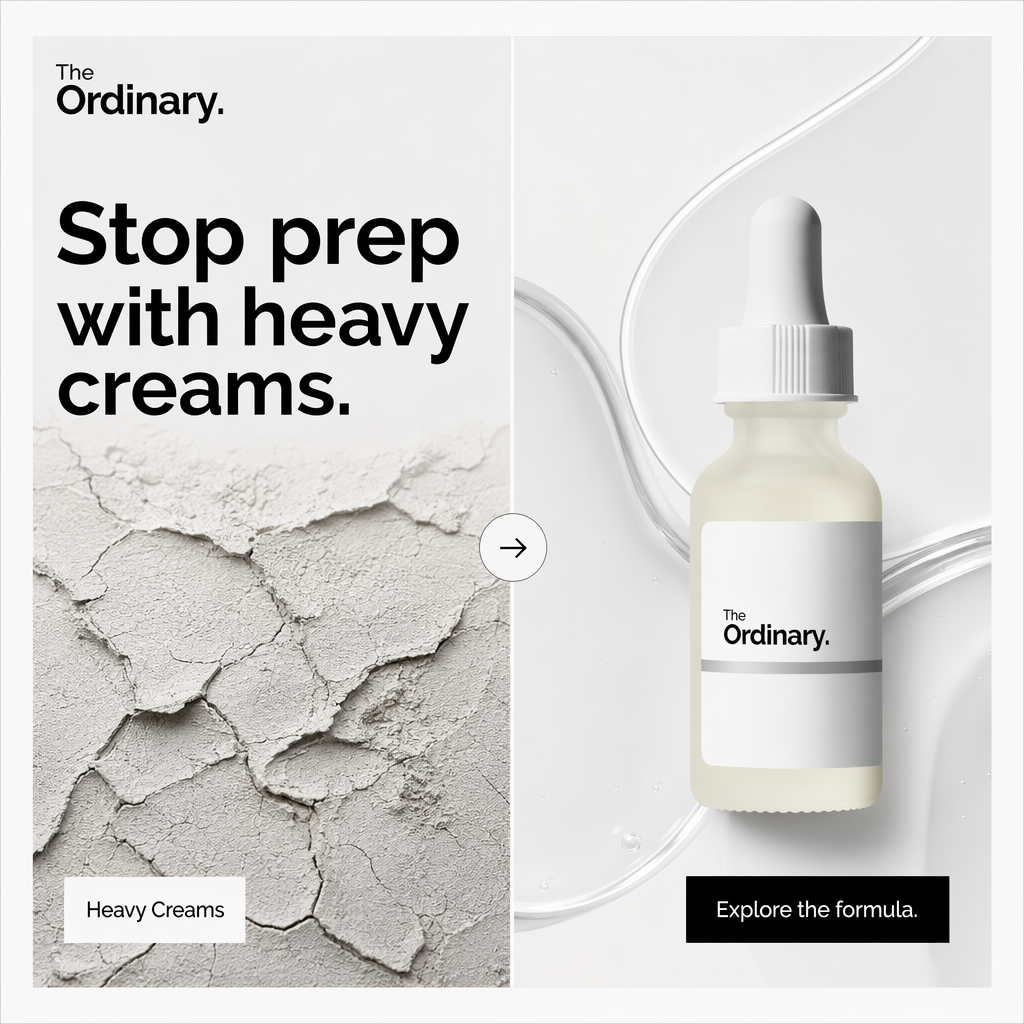
A contrast-pattern ad (old way vs new way) generated in the same run. Notice what a non-expert did not have to know: that contrast layouts work for switchers, that the cracked-texture visual sells the "heavy" problem, or that the CTA should read "Explore the formula" for an ingredient-led brand. The strategy came with the ad.
So which platform should you pick?
- You have a product page and zero ads experience → a URL-to-creative platform. Smallest homework, fastest first ad. Start with generating ads from your product URL.
- You have photos, taste, and time, and want a skill → a template/design tool.
- You specifically need creator-style video testimonials → an avatar/UGC tool, once you can already judge static ads.
- You are scaling past your first wins → add structure with our guide to scaling ad creative without designers, and treat the creative management question as your next read.
FAQ
What's the best AI ad platform for non-experts? A URL-to-creative platform, because it is the only category whose required input (a product page URL) is something a non-expert already has. Other categories assume prompting skill, design judgment, or scriptwriting. LocalAds is built in this category: it turns a product URL into finished, on-brand ad creatives with strategy and copy included, animatable to video.
Can I really make ads with no design experience? Yes, if the tool produces finished creatives rather than editable drafts. The test: does the output need you to open an editor? If yes, design experience is still being assumed, just later in the process.
Do AI ad platforms handle the targeting too? Increasingly the ad networks themselves do. Meta's Advantage+ and Google's responsive display systems automate delivery and layout assembly, which shifts the human job to supplying strong creative variations. Your platform choice should optimize for creative quality and volume, not targeting features.
How much do AI ad platforms cost for beginners? Less than the alternative you are comparing against, which is not "free": it is a freelance designer per creative, or an agency retainer per month. Creative platforms typically run on monthly subscriptions comparable to one or two freelance creatives. Compare per-shipped-ad, not per month.
What mistakes do non-experts make with AI ad tools? Three big ones: running the first output instead of generating a batch and selecting; letting generated copy make claims the product page does not support; and starting with video before they can judge statics. All three are selection and review problems, so budget your time there, not in an editor.
The takeaway
"Best for non-experts" means "assumes the least." Prompt tools assume art direction, design tools assume taste, video tools assume scripts, campaign suites assume vocabulary. A URL-to-creative platform assumes a URL. Start there, judge the batch with your own eyes, and let the strategy, copy, and design arrive already done.
Related reading: