On this page
Listings with high-quality, compliant images convert at two to three times the rate of listings with mediocre visuals. That single fact is why your image gallery, not your bullet points, is doing most of the selling on a crowded search results page.
Here is the problem most sellers run into. Amazon gives you up to nine image slots, and filling all of them well is a real production job: a clean main image on white, lifestyle shots, feature infographics, a dimensions graphic, a comparison, social proof. Photographers and designers are slow and expensive. And the obvious shortcut, generic AI image tools, has a reputation problem: every guide worth reading now warns that obvious AI visuals make a product look cheap, because the tool quietly redraws the product into something that is not quite what ships in the box.
This post covers what a complete set of Amazon listing images should contain, slot by slot, and how to produce all nine from an Amazon listing URL or ASIN in minutes, with the product itself kept accurate, and without writing a single prompt.
How many images should an Amazon listing have?
Use all nine. Amazon allows up to nine images including the main image, and there is no scenario where fewer high-quality images beats more, as long as each one earns its slot. Roughly seven are visible on the main detail page before the buyer clicks through, so the first several need to carry the most weight.
The mistake is not the number of slots. It is filling them with near-duplicate product shots from slightly different angles. Each image should answer a different buyer question. Treat the gallery as a silent sales conversation that runs top to bottom.
The 9 slot strategy, one job per image
A listing gallery converts when every slot does a distinct job. This is the same discipline as building a nine-angle set from one product URL, applied to Amazon's specific slot order. Here is a strategy that holds up across most physical-product categories:
- Main image. The product alone on a pure white background (RGB 255,255,255), filling at least 85% of the frame. This is the one slot Amazon regulates tightly, and it is the thumbnail every shopper sees in search.
- Key feature infographic. The single most important benefit, stated in a few words over a clean product shot. This is often the first image a buyer taps.
- Secondary features infographic. Two to four more benefits with short callouts. This is where you answer "what does it actually do."
- Lifestyle image. The product in real use, in the setting the buyer pictures themselves in. This builds desire, not just understanding.
- Dimensions and specs. Size, weight, materials, what is in the box. This image kills the "will it fit / is it big enough" hesitation that drives returns.
- Comparison or differentiation. Why yours over the alternative, framed honestly around real advantages.
- Social proof. A rating, a review quote, or a "trusted by" cue that borrows credibility.
- How-to or use steps. A simple three-step visual that removes "is this complicated to use" friction.
- Packaging or trust image. What arrives, warranty or guarantee, or a brand cue that signals this is a real company.
You do not have to follow that order rigidly, and some categories will weight infographics over lifestyle or vice versa. The principle is fixed: nine slots, nine jobs, no filler.
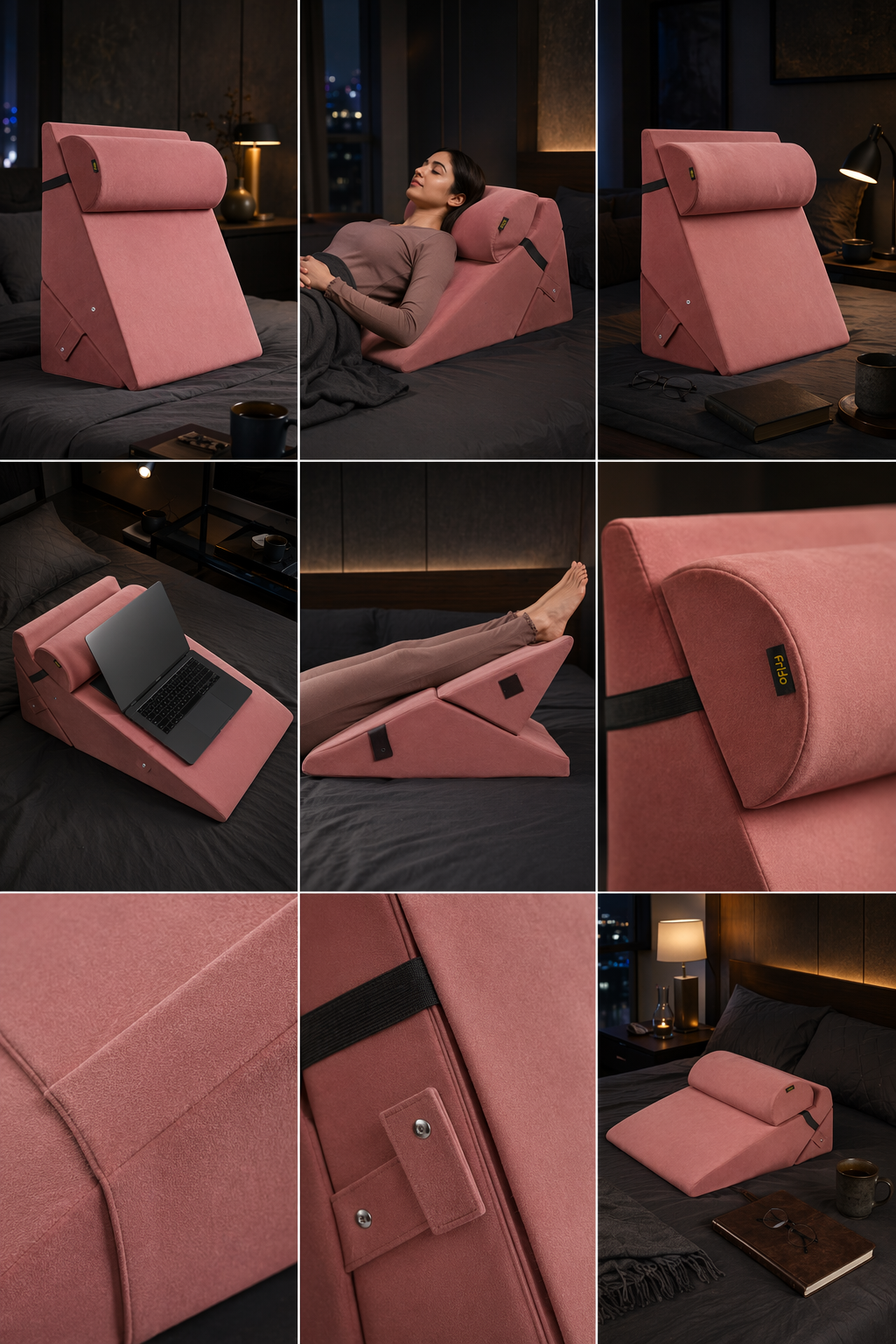
A real LocalAds run for the comfort brand Frido: one cushion, nine angles. Hero scenes, use cases (laptop stand, leg rest), and trust-building close-ups of the fabric and hardware, generated from the listing URL in one consistent style.
The technical specs that actually matter
Sellers lose conversions on details Amazon does not always flag for you. Keep these in range:
- Minimum accepted size is 1000 x 1000 pixels. Amazon recommends 1600 x 1600 or larger on the main image so the zoom function turns on, which buyers use constantly.
- The practical sweet spot is 2000 to 3000 pixels on the longest side. Big enough to look crisp, not so heavy it slows the page.
- Main image must be pure white, product only, no text, no badges, no props, with the product filling at least 85% of the frame.
- Secondary images can carry text, graphics, lifestyle scenes, and overlays. This is where your strategy lives.
Getting these right is table stakes. The conversion lift comes from the strategy on top of them.
Why generic AI image tools backfire here
The reason most listing guides tell you to avoid AI visuals is not snobbery. It is accuracy. Prompt-based image generators redraw your product from a text description, so the bottle gets an extra cap thread, the label text turns to gibberish, the fabric weave changes, the color drifts half a shade. On a Meta ad you might get away with it. On an Amazon listing, where the buyer is comparing the image to what they expect to receive, a distorted product reads as low quality and drives returns and bad reviews.
So the bar for AI on Amazon is higher than anywhere else: the creative around the product can be generated, but the product itself has to stay faithful to what actually ships. That is the real test, and it is the one most tools fail.
How LocalAds builds your nine images from one URL
This is the part LocalAds is built for. You paste your Amazon listing URL or ASIN, and it reads the page: the product, the specs, the claims, the brand. Then it produces nine conversion-tested listing images that cover the full slot strategy above, main image through trust image, sized and formatted to publish directly to Amazon. No prompting at any step.
The point that matters most for this use case is product image accuracy. LocalAds keeps your actual product faithful in every creative rather than redrawing it, so the infographics, lifestyle scenes, and comparisons are built around the real item, not an AI approximation of it. You get the speed of generated creative without the distortion that gets listings flagged as cheap.
Pricing fits how sellers actually work. The Amazon plan is a flat 10 dollars per ASIN for nine images, with a two-ASIN minimum (20 dollars for 18 images). It is a one-time charge with no subscription, because listing images, unlike ad creative, do not need a constant refresh once they convert. You can see real examples in the showcase before running your own, and start on the Amazon plan here.
What this changes about launching and refreshing listings
For a new launch, the slow step is almost always the gallery. Copy and keywords you can draft in an afternoon; a full set of nine strategic images traditionally meant a photographer, a designer, and a week of back and forth. Compressing that to minutes means you launch sooner and with a complete gallery instead of three placeholder shots you "fix later" and never do.
For existing listings, the move is to audit your current gallery against the nine-slot strategy. If you have five near-identical product shots and no infographic, no dimensions graphic, and no comparison, you are leaving the two-to-three-times conversion lift on the table. Regenerating a complete, accurate set from your existing URL is usually the highest-leverage hour you can spend on an underperforming listing.
FAQ
How many images can you put on an Amazon listing? Up to nine, including the main image. Around seven show on the main detail page before a shopper clicks to expand the gallery. Best practice is to fill all nine slots, with each image doing a distinct job rather than repeating the same product shot.
What images convert best on Amazon? A pure-white main image, followed by feature infographics, a lifestyle shot, a dimensions or specs graphic, a comparison, social proof, and a how-to. High-quality, compliant galleries convert at roughly two to three times the rate of weak ones, so the spread of image types matters as much as the photography.
Can you generate Amazon listing images with AI? Yes, but accuracy is the dealbreaker. Generic prompt-based tools redraw the product and introduce distortions that make a listing look cheap. The safe approach is a tool that keeps your real product faithful and only generates the creative around it, like the backgrounds, infographics, and lifestyle scenes.
What size should Amazon product images be? At least 1000 x 1000 pixels, with 1600 x 1600 or larger recommended on the main image to enable zoom. The practical sweet spot is 2000 to 3000 pixels on the longest side. The main image must be pure white with the product filling at least 85% of the frame.
How fast can I get a full set of listing images? With LocalAds you paste the Amazon listing URL or ASIN and get all nine images in minutes, formatted to publish directly to Amazon, for 10 dollars per ASIN. No prompting and no design round-trips.
The takeaway
Your Amazon gallery is the conversion engine, and nine strategic, accurate images beat three pretty ones every time. The hard part was never knowing that; it was producing a complete, on-brand, compliant set without a week of photography and design, and without an AI tool quietly distorting your product.
If you have a listing running on a half-empty gallery, paste the URL into LocalAds and get all nine slots filled with accurate, ready-to-publish images. Launch faster, convert higher, and skip the prompt engineering entirely. Want a free second opinion first? Run your ASIN through the Listing Doctor for an instant image audit.
Related reading: